Mobs Maker for Minecraft PE
PAMG StudioLibraries & Demo
3.2136.00 Reviews
- Version
- 1.4.0
- Installs
- 500.00K
- Age Rating
- Teen
Screenshots
Our Review of Mobs Maker for Minecraft PE
 Analysis by Appyee
I approach Minecraft add-ons as small creative projects: the fun is not only having a different creature in the world, but shaping an idea into something that feels personal. Mobs Maker for Minecraft PE is aimed at that tinkering mood. It is a free creative app from JoyCraft Studio in the Libraries & Demo category, and its focus is making custom mobs for Minecraft Pocket Edition with Blockbench. I find that specific purpose more appealing than an all-purpose collection of add-ons, though it also means the app suits curious builders better than players who simply want a ready-made change.
What free access means in practice
You can start without paying: the app is free to download, with in-app purchases listed at $3.49 per item. That gives a newcomer a straightforward way to see whether mob creation is enjoyable before spending anything. I would treat the purchase detail as a reason to check what an item offers in the app before buying, rather than assuming every creative tool or option is included at no cost.
For me, the useful question is not whether a creative app has a price attached, but whether I will use its particular workflow. If you enjoy experimenting with creature ideas, free access makes it easier to try the concept. If you only want a finished mob with minimal effort, even a free editor can feel like work. The app is marked Teen, so younger users and families should take that age guidance into account when deciding whether it is a suitable download.
Getting Started with Your Blocky Creations
The first thing you'll notice when you fire up the Mobs Maker for Minecraft PE is its straightforward interface. It's got that no-nonsense, user-friendly vibe that makes diving into creation a breeze. No need to fumble around; you can get straight into crafting your dream mobs.
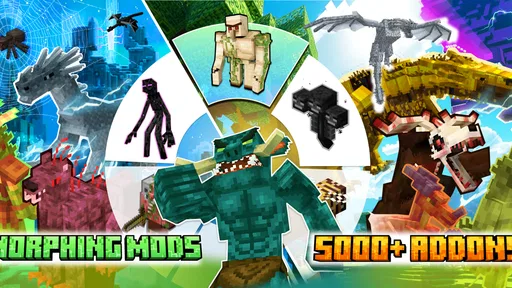
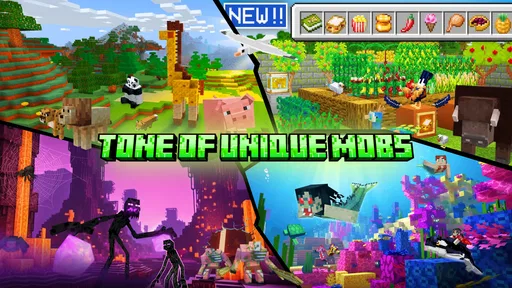
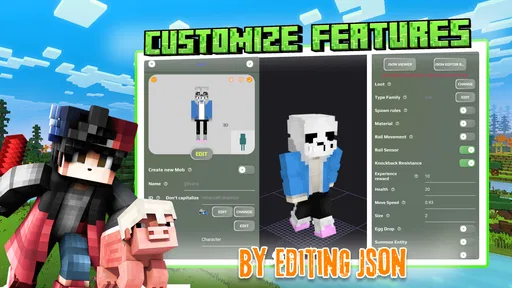
After a quick setup, I was greeted with templates galore! From zombies to creepers, you’ve got a whole host of pre-made models to tweak and tinker with. You can change colors, add textures, and even modify behaviors. Ever wanted a flying creeper? Well, here’s your chance. The app gives you a bunch of sliders and options to make your mob as wacky or as terrifying as you like.
Design tools and the idea-to-model workflow
Now let’s talk features. The app is packed with tools that let you customize every tiny detail. Fancy giving a skeleton a flaming head? Go for it! The level of customization is actually quite impressive. You can adjust the size, abilities, and even the sounds your mob makes. It’s like being a mad scientist but with pixels.
One of my favorite features is the ability to save and share your creations. Made an epic mob that you’re super proud of? You can share it with friends or the larger Minecraft community. It’s a neat way to show off your skills or get some inspiration from others.
The best way to get a satisfying result is to begin with a clear, small concept rather than trying to redesign every part at once. I’d pick one recognizable base, decide what should make the creature distinct, then adjust its look and behavior around that idea. For example, a familiar hostile mob with a harmless-looking palette can be easier to judge than a creature with a completely unfamiliar silhouette, color scheme, and set of abilities all changed together. Making one kind of change at a time also makes it easier to tell which choice improved the design.
There is a practical trade-off in starting from a template: it gives you a useful starting point, but it can also steer your imagination toward familiar Minecraft creatures. I would use templates as scaffolding, not as a limit. A simple visual change can be enough for a personal variation; a more ambitious project benefits from thinking about how the model, its behavior, and its sound fit together. A mob may look striking in an editor but feel incoherent if those choices do not support the same idea.
Where it fits among creator tools
Compared with browsing for a ready-made add-on, creating a mob here puts more responsibility on you and offers more room to make a design your own. That is the main value: the activity is not just selecting someone else’s finished creature, but making choices and iterating on them. The other side is that ready-made content is usually the simpler route when all you want is to change a world quickly. I would choose this app for the making process, not as a shortcut to instant new content.
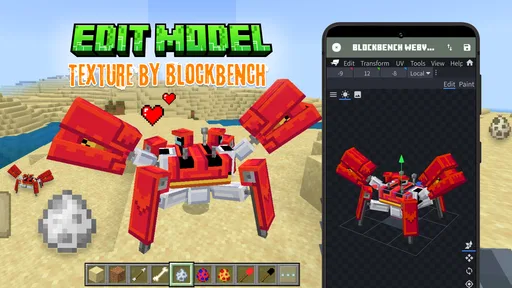
Blockbench is part of the app’s stated creative context, so it is relevant to people who want to make models rather than only browse Minecraft ideas. Still, a mobile-oriented creation flow is not automatically the best fit for every project. If you are looking for a broader, highly technical modeling workflow, or prefer to work with a full desktop tool, a dedicated editor may suit you better. If you want to experiment casually with mob concepts on a phone or tablet, a focused tool can feel less daunting than opening a more general modeling environment.
Saving, sharing, and keeping a project manageable
Saving and sharing make the creative loop more useful than a one-off experiment. I would save a basic version before making bigger changes, then keep a note of the idea behind each variation. That way, if a later experiment looks worse or feels less coherent, you have a clear point to return to instead of trying to reconstruct the original design from memory.
Sharing is most useful when you treat it as a way to get a second opinion, not only as a way to show off a finished result. A friend can tell you whether the creature’s appearance communicates what you intended, or whether its behavior seems to match its design. If you plan to share with a wider Minecraft community, it is sensible to describe what makes your mob different and what kind of experience you intended. That gives others more to respond to than an image alone.
The Experience: Smooth Sailing or Rocky Road?
Let’s be real, all this customization sounds amazing, but how does it perform? I was pleasantly surprised at how smoothly the app runs. There were no crashes or major lags even when I went a little overboard with my mob designs. The transitions between different customization options were seamless, making for a pretty enjoyable experience overall.
However, I did notice a few quirks. Occasionally, the app would take a second longer to load certain textures or options. Not a deal-breaker by any means but something to keep in mind if patience isn’t your strong suit.
That occasional wait matters most when you are trying lots of small visual changes in quick succession. I would avoid judging a texture immediately if it has not finished appearing; pause, check the model again, and only then decide whether to adjust it. This small habit can prevent needless backtracking and makes experimentation less frustrating. The app’s general ease of use helps, but it does not remove the need to be patient with a creative tool.
For a first project, I would also keep the scope modest. Try a single character concept, make a few deliberate edits, and see how the result feels before adding more complexity. That approach helps separate a limitation in the tool from an idea that simply needs refinement. It also makes the app easier to judge fairly: if you begin with a huge design brief, the number of decisions can become the obstacle rather than the interface.
A realistic place for it in a Minecraft routine
Imagine you have a short stretch of free time after building a base and want a small creative task that connects to your world. You could sketch a mob concept around that build, start from a familiar model, and make a focused set of changes. Maybe the creature should look as if it belongs in a snowy area, or its sound and behavior should suit a particular role in your imagined world. The point is not to complete a sprawling project in one sitting; it is to turn a passing idea into a model you can refine and share.
That kind of session is where I see the app being most rewarding. It gives a Minecraft fan a bridge between playing and making, without requiring the project to begin as a full modding plan. On the other hand, if your aim is to install something instantly and return straight to survival play, the creation steps may feel like an unnecessary detour. The choice depends on whether you enjoy designing as much as using the result.
Who is likely to get the most from it?
I would recommend trying it if you like Minecraft’s visual language, enjoy customizing characters, or want to share original creature concepts with friends. It can also be a useful starting point for someone curious about how a mob’s appearance and behavior contribute to its identity. The app’s approachable, template-based direction is helpful when you have an idea but do not know how to begin shaping it.
I would skip it if you do not want to spend time making choices, if you mainly want a library of finished add-ons, or if your priority is advanced modeling control beyond a focused mob-making workflow. It is also a poor match if you expect every creative task to feel instant: design involves trying options, comparing versions, and sometimes undoing a choice. Those are normal parts of making something, but they are not enjoyable for every player.
The Android version is currently listed as version 1.3.8 and requires Android 7.0 or later. That makes the minimum system requirement easy to check before installing, especially if you are using an older device. The app has an average rating of 3.6 from around 1.7 thousand ratings, with 120 written reviews, and has passed 500 thousand installs. I see those figures as context rather than a promise: they show that people are trying it, but they cannot tell you whether its creative workflow matches your own preferences.
Final thoughts: a creator’s tool, not an instant add-on
So, is Mobs Maker for Minecraft PE worth the download? If you're someone who loves adding a personal touch to your Minecraft experience, then absolutely. The app offers a fun, engaging way to expand your game and is a perfect tool for those creative juices.
Whether you're creating the next big YouTube sensation or just want a unique mob to call your own, this app has got you covered. It’s a great way to enhance your Minecraft adventures and share your creations with fellow fans.
In conclusion, if you’re ready to unleash your inner mob creator, Mobs Maker for Minecraft PE is definitely worth checking out. Get creative, have fun, and happy crafting!
My buy-or-skip verdict is simple: try the free app if building and refining a creature sounds like fun, and judge any optional purchase by the specific item you are considering. I would not pay on the assumption that a particular feature is essential without first seeing how the free experience suits me. For the right person, the value is in the hands-on process and the chance to make a mob that feels personal. For someone who wants instant, ready-to-use content or a more expansive modeling setup, another route will be a better fit.
Privacy and Permissions
See what permissions an app requests and how it handles your data.
- Photos/Media/Files
- read the contents of your USB storage, modify or delete the contents of your USB storage
- Storage
- read the contents of your USB storage, modify or delete the contents of your USB storage
- Other
- view network connections, full network access, control vibration
Verdict
Strengths of Mobs Maker for Minecraft PE
- Easy customization for Minecraft worlds.
- User-friendly interface for all ages.
- Wide range of mob options available.
- Regular updates with new content.
- Offline mode for uninterrupted creativity.
Limitations of Mobs Maker for Minecraft PE
- Limited free features; in-app purchases needed.
- Occasional bugs can disrupt experience.
- Ads can be intrusive during use.
- Requires internet for initial setup.
- Not all features available on older devices.
Other Releases by PAMG Studio
View All
AddOns Maker for Minecraft
Personalization3.7
Similar Picks in This Category
View All
PGT: GFX, Launcher & Optimizer
Trilokia Inc.4.5

AusweisApp Bund
Governikus Service GmbH3.7

Cardboard
Google LLC3.2

Gamers GLTool with Game Tuner
Trilokia Inc.4.5

Multi Web Chat - Read Secretly
World Scan & Cleaner3.8

App Cloner Premium & Add-ons
App Listo1.9
Frequently Asked Questions
What is Mobs Maker for Minecraft PE and how does it work?
Mobs Maker for Minecraft PE is an app designed to enhance your Minecraft Pocket Edition experience by allowing you to create and customize your own unique mobs. The app provides a user-friendly interface where you can easily modify mob attributes such as appearance, behavior, and abilities, then integrate them seamlessly into your game.
Is Mobs Maker for Minecraft PE compatible with all versions of Minecraft PE?
Mobs Maker for Minecraft PE is compatible with most recent versions of Minecraft Pocket Edition. However, it’s always a good idea to check the app’s requirements and ensure your game is up-to-date to avoid any compatibility issues. Updates to the app are released periodically to support newer versions of the game.
Are there any costs associated with using Mobs Maker for Minecraft PE?
The app is free to download, but it may offer in-app purchases for additional features or content. These optional purchases can enhance your customization experience but are not necessary for basic functionality. Be sure to check the app store for the latest details on pricing and available features.
How user-friendly is Mobs Maker for Minecraft PE for beginners?
Mobs Maker for Minecraft PE is designed with a simple and intuitive interface, making it accessible to users of all skill levels. Beginners will find the step-by-step guides and tutorials particularly helpful in navigating the app and creating their first custom mobs without needing any prior experience.
Can I share my custom mobs with other players?
Yes, the app allows you to export and share your custom mobs with other Minecraft PE players. This feature encourages creativity and collaboration within the Minecraft community, enabling you to showcase your creations and enjoy those made by others. Check the app for specific instructions on exporting and sharing.
